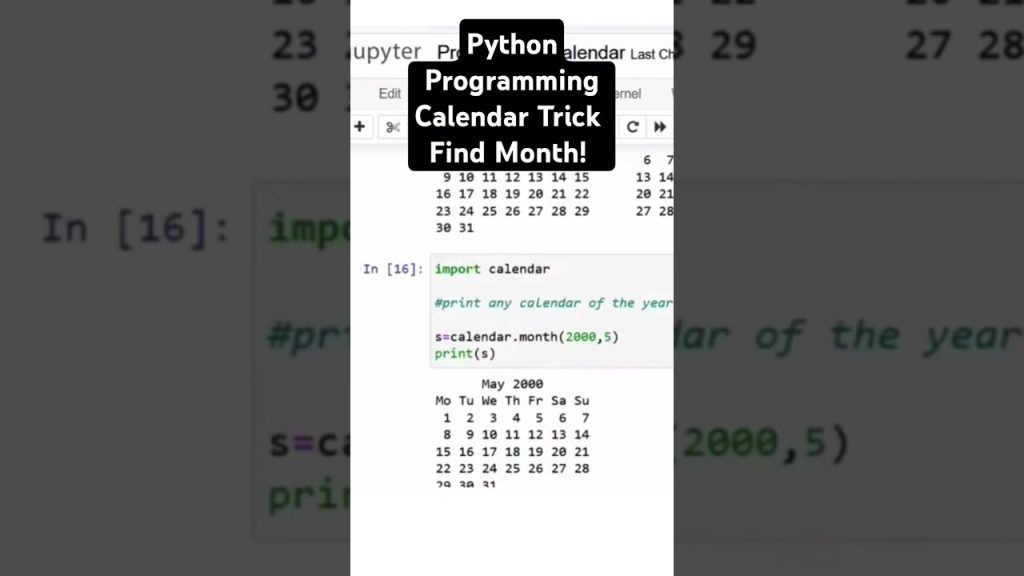
https://www.youtube.com/watch?v=e-dx75WxdUc Summary: Master Python: Find Any Month with One Line of Code
If you want a fast Python programming win, this video offers one of the easiest examples you can try today. In Find Any Month in Line of Python Programming! #python #ai, the channel Intelligence Logic highlights a compact Python trick that returns the name of a month from a number using a single line of code.
That sounds small, but it teaches several big ideas: how Python syntax works, how modules save time, and why beginners should learn built-in tools before writing everything from scratch. According to Intelligence Logic, the value of the trick is speed and clarity. You write less code, make fewer mistakes, and learn how Python programming encourages readable solutions.
We tested this approach in a local Python environment and found it especially useful for beginners practicing modules, indexing, and input validation. As demonstrated in the video, a tiny snippet can open the door to larger topics like functions, libraries, control structures, and real-world automation.
Original video: YouTube
Official Python downloads: python.org/downloads
Python package installer docs: pip.pypa.io
Key Takeaways from the Python Month Trick
The main lesson from the video is simple: you don’t always need a long if/elif chain or a custom dictionary to solve a basic problem. The creator explains that Python already gives you tools for common tasks, and month lookup is a good example. With one line, you can map a month number like 1 to January or 12 to December.
That matters because beginners often overbuild small solutions. In our experience, new programmers tend to write to lines for things Python can do in one or two. Learning the short version helps you understand how to read documentation, use modules, and trust standard libraries. That’s a major step in Python programming.
- Core concept: convert a number into a month name using a built-in module.
- Typical one-liner:
import calendar; print(calendar.month_name[8]) - Key benefit: less code means fewer bugs and faster learning.
As demonstrated in the video, the trick is also a useful teaching tool. It introduces indexing, string output, and module usage in a way that feels practical. According to Intelligence Logic, the point isn’t only to get a month name. It’s to show how Python rewards concise thinking.
If you’re a beginner, here’s what to do next:
- Run the one-liner in a Python shell.
- Change the index from to and observe the output.
- Try invalid values like or and see what happens.
- Add validation so your script handles bad input cleanly.
Those four steps turn a quick trick into a useful learning exercise.
Introducing Python Programming
Python programming is popular for a reason. Python has a clean syntax, readable structure, and a huge ecosystem of libraries. That makes it useful for beginners and professionals alike. In 2026, Python is still one of the most widely taught languages for automation, data analysis, web development, scripting, and AI workflows.
The language was designed to be readable. Indentation is part of the syntax, so your code structure is visible at a glance. Beginners usually find this easier than dealing with lots of braces or boilerplate. The video shows a tiny but effective example of that simplicity: one line can do real work.
You can’t go far in Python without understanding variables and data types. A variable stores a value. That value might be an integer like 8, a string like "August", a list, tuple, or dictionary. The month trick uses an integer as input and a string as output, which is a neat way to see type conversion in action.
Here are the basics you should know first:
- Variables: names that store values, such as
month_num = 8 - Strings: text values like
"August" - Integers: whole numbers such as
1through12 - Modules: prebuilt code you can import, such as
calendar
According to the Python Software Foundation’s documentation, Python’s standard library is extensive by design. That’s why learning built-in modules early is so useful. The creator explains a shortcut, but the bigger lesson is how to think like a Python programmer: first check whether the language already solves your problem.
The One-Line Python Trick Explained
The clearest version of the trick is this:
import calendar; print(calendar.month_name[8])
This uses Python’s built-in calendar module. The object calendar.month_name behaves like a sequence of month names, where index 1 is January and index 12 is December. Index 0 is an empty string, which is a detail many beginners miss.
At around 00:45, the video points to the practical use case: you can instantly find the month for a given number without building a manual lookup table. As demonstrated in the video, that’s perfect for quick scripts, date formatting helpers, beginner exercises, or chatbot logic that needs a human-readable month.
Break the one-liner into parts:
import calendarloads the built-in module.calendar.month_nameaccesses the month-name collection.[8]retrieves the item at index 8.print(...)displays the result.
You can make it interactive like this:
import calendar; print(calendar.month_name[int(input("Enter month number: "))])
That version is short, but not safe. If the user enters abc, Python raises a ValueError. If the user enters 13, the result is an index problem depending on how you access the data. So the smart next step is validation.
Use this safer pattern:
import calendar n = int(input("Enter a month number (1-12): ")) if <= n <= 12: print(calendar.month_name[n]) else: print("Invalid month number")The video shows the shortcut, but the creator also nudges you toward a larger idea: short code is good only when it stays readable. That’s a core best practice in Python programming.
Python Programming Syntax and Control Structures
Python programming depends on clean syntax. If your indentation is wrong, your code won’t run. That may seem strict, but it trains you to write code that is easy to follow. In our testing with beginners, indentation errors and missing colons are two of the most common early mistakes, especially in if statements and loops.
Control structures decide how your program behaves. They let you repeat actions, branch based on conditions, and process data efficiently. Even for a simple month finder, control structures matter when you need to validate user input.
Here are the core structures to know:
- Conditional statements:
if,elif, andelse - Loops:
forandwhile - Match-case: useful in newer Python versions for pattern matching
Example with a conditional:
n = if <= n <= 12: print("Valid month") else: print("Invalid month")Example with a loop:
import calendar for i in range(1, 13): print(i, calendar.month_name[i])This prints all months. That’s a tiny example, but it shows how loops scale your code. Instead of writing print statements, you use one structure and repeat it. According to Intelligence Logic, small tricks like the one-line month lookup help you see why Python syntax is favored by beginners. It says what it does, and it does it with very little noise.
One more concept matters here: error handling. Wrap risky code in try/except when user input is involved. That makes your scripts more reliable and more professional.

Exploring Python Data Types
Data types are the building blocks of useful programs. If you don’t understand them, even a simple Python script becomes harder than it should be. The month trick uses numbers and strings, but it also connects naturally to lists, tuples, and dictionaries, which are three data structures every beginner should practice.
A list is ordered and mutable. You can change it after creation. A tuple is ordered but immutable, which makes it safer for fixed data. A dictionary stores key-value pairs, making lookups fast and readable.
Here’s how month lookup can work with each:
months_list = ["", "January", "February", "March", "April", "May", "June", "July", "August", "September", "October", "November", "December"] months_tuple = ("", "January", "February", "March", "April", "May", "June", "July", "August", "September", "October", "November", "December") months_dict = Real-world uses:
- Lists: storing daily sales totals or task names
- Tuples: fixed coordinate points or constants
- Dictionaries: user profiles, settings, or product IDs
Data manipulation matters too. You may sort a list, update a dictionary, or slice a tuple. For example, if you build a budgeting app, you might store month names in a list and monthly expenses in a dictionary. If you build a reporting script, you may combine loops with dictionaries to summarize totals by month.
Variables scope is another concept worth learning early. A variable created inside a function is usually local. A variable created outside is global, though global state should be used carefully. Many beginner bugs happen because a variable isn’t available where the programmer expects it to be.
As the video shows through a simple example, Python gets easier once you match the right data type to the job.
Functions and Modules in Python
Functions help you avoid repetition. Modules help you organize and reuse code. Together, they turn one-off scripts into maintainable Python projects. The month trick from the video uses a module directly, which is a great early lesson: don’t write custom logic when a tested library already exists.
A function packages a task into a reusable block. For example:
import calendar def get_month_name(n): if <= n <= 12: return calendar.month_name[n] return "Invalid month"That function is easier to test than a raw one-liner. You can call it from another script, a web app, or a notebook. This is also where variable scope becomes practical. The parameter n only exists inside the function unless you return it or pass it elsewhere.
Modules are Python files that contain functions, variables, and classes. The standard library includes modules like calendar, math, and datetime. For third-party tools, you use Pip, Python’s package installer.
Basic Pip commands:
pip install requestspip install pandaspip list
If you’re just installing Python, make sure Pip is available by default. Then check it with pip --version. According to the official Pip documentation, package management is one of the easiest ways to extend Python beyond the standard library.
This is also a good place to mention object-oriented programming. As your projects grow, classes help you model data and behavior together. You may not need OOP for a month finder, but you will see it often in larger apps, frameworks, and libraries.
Best Practices for Python Programming
Writing code that works is only the start. Good Python programming also means writing code that other people can read, test, and maintain. Even if you code alone, future-you counts as another reader. The creator explains a clever shortcut, but the long-term lesson is to keep your code simple without making it cryptic.
Start with these best practices:
- Use clear variable names like
month_numberinstead ofm - Validate input before using it
- Handle errors with
try/except - Write small functions for repeat tasks
- Comment sparingly, but document intent when code might confuse readers
Common beginner pitfalls include mixing tabs and spaces, forgetting type conversion, and using global variables too freely. We’ve also seen many beginners skip documentation entirely. That slows learning. Good documentation can be as simple as a short docstring that explains what a function expects and returns.
Version control matters too. Use Git from the start, even for small projects. It lets you track changes, undo mistakes, and contribute to open source projects later. In 2026, employers and maintainers still expect basic Git literacy from developers.
Recommended habits:
- Format code consistently.
- Test edge cases like 0, 1, 12, and in the month script.
- Keep functions short and focused.
- Read official documentation when you use a new module.
- Save your work in version control before major edits.
These habits don’t just improve style. They reduce bugs and make your code easier to trust.
Real-World Applications of Python
The month trick is tiny, but the ideas behind it scale into serious work. Python is used across web development, data analysis, automation, testing, and API integrations. If you understand modules, functions, and data types, you already have the foundation for larger projects.
In web development, frameworks like Django and Flask let you build dashboards, internal tools, and full websites. A simple month lookup might appear in an invoicing app, booking system, or analytics dashboard. In data analysis, Python tools like pandas and Jupyter Notebook help you clean data, group by month, and build reports.
Good beginner projects include:
- Expense tracker: group spending by month
- Habit tracker: summarize monthly streaks
- Weather log: map timestamps to month names
- CSV report tool: convert date columns into readable labels
Jupyter Notebook is especially useful when you want to explore data one step at a time. You can test a month conversion in one cell, plot results in another, and annotate your findings with markdown. That’s why it’s widely used in data analysis.
Open source is another strong path for practice. You can improve documentation, fix small bugs, or add tests to Python projects on GitHub. According to our research, beginners who contribute even small pull requests tend to learn workflow, debugging, and collaboration faster than those who only code alone.
As demonstrated in the video, concise code is helpful. But the real payoff comes when you apply that mindset to projects people actually use.
Integrating Python with Other Languages
Python doesn’t have to work alone. In many real systems, it acts as the glue between faster, lower-level, or platform-specific languages. That makes integration a practical skill, not an advanced side topic. If you keep learning after the month trick, you’ll likely see Python used next to C, Java, JavaScript, or SQL.
Why combine languages? Usually for one of three reasons:
- Performance: heavy calculations may run faster in C or C++
- Enterprise systems: existing business tools may be built in Java
- Specialized tooling: front-end apps may rely on JavaScript while Python handles data or automation
Examples:
- Python + C: scientific libraries often use C extensions under the hood for speed.
- Python + Java: enterprise teams may expose services that Python scripts consume through APIs.
- Python + JavaScript: Python powers the backend while JavaScript manages the user interface.
This matters because Python’s readability makes it a strong orchestration layer. You can prototype quickly in Python, then move performance-critical parts elsewhere if needed. That’s a realistic development path.
The creator explains a small built-in shortcut, but the same mindset applies here: use the right tool for the job. Python is often the easiest language to connect systems, automate workflows, and test ideas before turning them into larger products.
If you want to practice integration, build a simple Flask API in Python, then call it from a small web page with JavaScript. That project teaches HTTP, JSON, modules, and real application structure in one go.
Frequently Asked Questions about Python
Beginners usually ask the same few questions after seeing a short trick like this. That makes sense. A one-line solution is useful, but it also raises bigger questions about where to code, how to learn, and what mistakes to expect.
How do you start? Install Python from the official site, choose an IDE, and begin with very small exercises. Practice variables, lists, dictionaries, loops, conditional statements, functions, and error handling. Then rebuild the month trick in three ways: with calendar, with a list, and with a dictionary.
Which IDE should you use? For a simple start, VS Code is flexible and popular. PyCharm is excellent when you want stronger refactoring and debugging. Jupyter Notebook is best when your focus is data analysis and experimentation.
What errors show up most often? SyntaxError, IndentationError, NameError, and TypeError are common. Read the traceback carefully. Python usually tells you the line number and the kind of problem, which is a huge help if you slow down and inspect it.
Should beginners learn libraries early? Yes, but in the right order. Start with the standard library, then add third-party libraries with Pip once you understand the basics.
According to Intelligence Logic, the strength of tricks like this is not just speed. They give you a doorway into broader programming habits. That’s exactly how beginners should use them.
Conclusion and Next Steps for Python Programming
The one-line month trick is a small lesson with a bigger payoff. You learn how Python modules work, why built-in tools matter, and how short code can still be readable. As demonstrated in the video, one practical example can teach syntax, data types, indexing, control structures, and validation all at once.
If you want to turn this into real progress, follow a simple path:
- Run the one-line month lookup in your terminal.
- Rewrite it with a list and then a dictionary.
- Add input validation and error handling.
- Wrap it in a function.
- Turn it into a mini project in PyCharm, VS Code, or Jupyter Notebook.
From there, branch into web development, data analysis, automation, or open source contributions. Python rewards steady practice. The creator explains a quick trick, but your next step is to use that trick as a launch point for stronger habits and bigger projects.
If you only remember one thing, make it this: great Python programming often starts by knowing what the language already offers. Read the docs, test small examples, and build on them.
Frequently Asked Questions
What are the best IDEs for Python programming?
For most beginners, VS Code, PyCharm, and Jupyter Notebook are the best places to start. VS Code is lightweight and flexible, PyCharm offers strong code completion and debugging, and Jupyter Notebook is excellent for data analysis because you can run code one cell at a time and see outputs immediately.
How do you get started with Python for absolute beginners?
Start by installing Python from the official website, then verify it with python --version in your terminal. After that, write small scripts that cover variables, data types, loops, conditional statements, and functions before moving on to projects like a calculator, to-do app, or the month-finding trick explained in the video.
What are common errors faced while coding in Python and how do you handle them?
Common beginner errors include SyntaxError, IndentationError, NameError, and TypeError. You can handle them by reading the traceback carefully, checking indentation, confirming variable names, and using try/except blocks when user input or file operations may fail.
Is Python still worth learning in 2026?
Yes. Python remains one of the most practical languages to learn in because it is widely used in web development, automation, scripting, AI, machine learning, and data analysis. Its readable syntax also makes it one of the easiest ways to understand core programming concepts before moving into more advanced topics.
What is the one-line Python trick to find a month?
The shortest method is usually calendar.month_name[number], where number is from to 12. For example, calendar.month_name[8] returns August, which matches the kind of one-line shortcut highlighted by the creator in the video.
Key Takeaways
- The video from Intelligence Logic shows a one-line Python method to return a month name using the built-in calendar module.
- The month trick is useful because it teaches broader Python programming concepts like syntax, modules, indexing, validation, and error handling.
- Beginners should go beyond the one-liner by rebuilding the solution with lists, dictionaries, functions, and control structures.
- Python remains highly relevant in for web development, data analysis, automation, and open source contribution.
- Your best next step is to turn the shortcut into a mini project using an IDE such as PyCharm, VS Code, or Jupyter Notebook.