
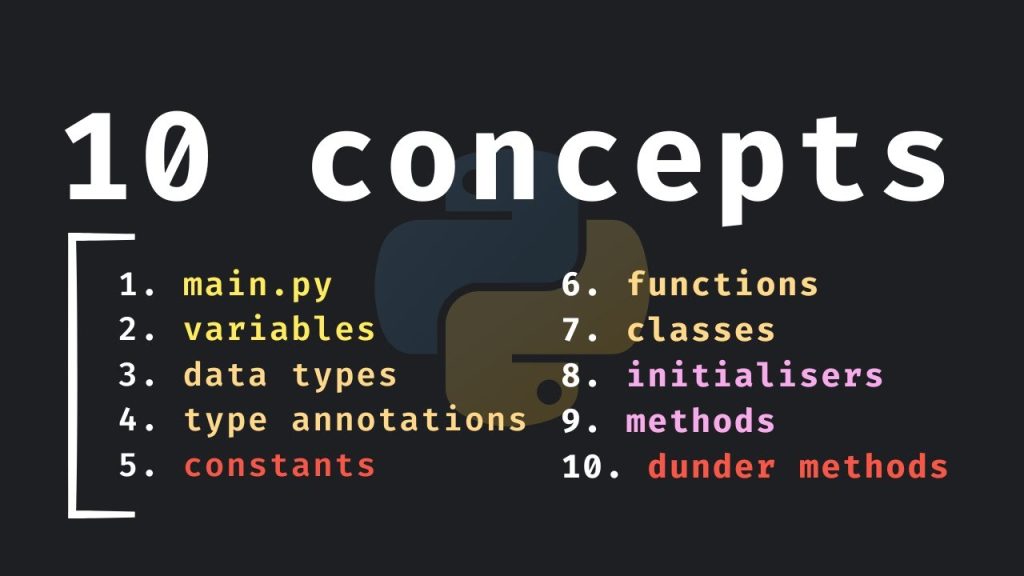
In this article, you’ll uncover ten essential concepts in Python that will boost your programming skills and confidence. Each concept is designed to help you become job-ready and enhance your understanding of this powerful programming language. From basic data types to advanced dunder methods, this journey through Python will equip you with the knowledge needed to excel in your coding endeavors.
You’ll explore topics like variables, functions, and classes, all condensed into a brief learning experience. Each section is crafted to provide clarity and practical insights, making it easy for you to absorb and apply these concepts quickly. Whether you’re a beginner or looking to refresh your skills, this guide is here to support your Python learning adventure.
Understanding .py Files
What are .py files?
A .py file is a text file that contains Python code. When you see a file with the .py extension, you know it’s designed to be executed by the Python interpreter. This makes .py files the building blocks of Python scripts, which can range from simple, one-off computations to large applications. They serve as a way to organize and run your Python code efficiently.
How to create a .py file
Creating a .py file is quite simple. You can use any text editor you like, such as Notepad, Visual Studio Code, or PyCharm. All you need to do is open your editor and write your Python code. Once you’re done, you can save the file with a .py extension. For instance, you might save it as my_script.py. This tells your operating system and Python interpreter that it’s a Python file.
Executing a .py file from the command line
To run your .py file, you can use the command line. First, navigate to the directory where your .py file is located. You can do that using the cd command (for “change directory”). Once you’re in the right directory, you can execute the file by typing python my_script.py and hitting Enter. This launches the Python interpreter and runs your script, allowing you to see the output directly in the terminal.
Variables in Python
Defining variables
Variables in Python are essentially names you give to data so you can easily refer to them in your code. You declare a variable by choosing a name and using the equals sign (=) to assign a value. For example, x = 10 defines a variable named x and assigns it the value of 10. You can store different types of data in variables, including numbers, strings, lists, and more.
Variable naming conventions
When naming your variables, you should follow certain conventions for readability and to avoid conflicts. Variable names can include letters, numbers, and underscores, but must start with a letter or underscore. It’s also advisable to use descriptive names that hint at the variable’s purpose. Instead of x, consider using total_score, which is much clearer.
Dynamic typing in Python
Python is dynamically typed, meaning you don’t need to declare a variable’s type explicitly. You can assign any data type to a variable and even change its type down the line. For example, you might start with value = "hello" and later set value = 42. This flexibility is powerful, but it also requires you to be careful about what you’re doing, as it could lead to type errors in larger programs.
Basic Data Types
Understanding integers and floats
In Python, the most basic data types are integers and floats. Integers are whole numbers, like 1, 42, or -7, while floats are decimal numbers like 3.14 or -0.001. These data types allow you to perform mathematical operations and manage numeric data easily.
Strings and their methods
Strings are sequences of characters enclosed in quotes, either single or double. For example, "Hello, world!" is a string. Python provides various string methods that enable you to manipulate and work with strings effectively. You can convert them to uppercase, find their length, and even split them into lists, making strings versatile for handling textual data.

Lists, tuples, and dictionaries
Python also offers several collection data types like lists, tuples, and dictionaries. Lists are ordered, mutable collections that can store items of different types, like my_list = [1, "apple", 3.14]. Tuples are similar to lists but are immutable, which means you cannot change their contents once they are created, like my_tuple = (1, "apple", 3.14). Dictionaries are key-value pairs, allowing you to retrieve values based on unique keys, such as my_dict = {"apple": 1, "banana": 2}. Each of these data types comes with its own functionality, making them extremely useful.
Type Annotations
What are type annotations?
Type annotations in Python allow you to specify the expected data types of variables, function parameters, and return values. They don’t enforce type checks at runtime but serve as additional documentation, making your code easier to understand. For example, you can define a function as def add_numbers(x: int, y: int) -> int:, indicating that x and y should be integers, and the function itself returns an integer.
Benefits of using type annotations
Using type annotations provides several benefits. They enhance code readability, making it clear what data types are expected. This clarity can help prevent bugs, especially in large codebases, as both you and others will have a better understanding of the intended use of various functions and variables. Additionally, tools like type checkers can leverage these annotations to catch errors before you run your code.
How to implement type annotations in functions
Implementing type annotations in your functions is straightforward. You simply add a colon and specify the type after each parameter. For instance, in the function definition def multiply(a: float, b: float) -> float:, you are expressing that the function takes two float arguments and returns a float. This practice will become second nature as you start incorporating it into your coding routine.
Constants in Python

Defining constants conventionally
In Python, constants are typically defined by convention, not by enforced rules. You’ll generally write constants using uppercase letters with underscores separating words, like MAX_VALUE = 100. This visually distinguishes constants from regular variables, helping developers recognize them easily.
Using constants effectively in code
Constants are extremely useful for managing fixed values that you may need to reference multiple times throughout your code. They can make your code clearer, as it’s easy to understand that certain values shouldn’t change. For example, using a constant for the mathematical value of pi (PI = 3.14159) can reduce the risk of errors from mistyping or altering values mistakenly.
Why use constants?
Using constants adds clarity and maintainability to your code. When a constant is referenced in multiple places, you only need to update it in one location, minimizing the chance of bugs. They also symbolize intent, signaling to other developers that the value is not expected to change. Hence, using constants is a good practice in writing robust and clean code.
Functions in Python
Defining and calling functions
Functions in Python are defined using the def keyword, followed by the function name and parentheses. Inside these parentheses, you can specify parameters that the function can take. For instance, def greet(name): defines a function that takes a name as an argument. You can call this function using greet("Alice"), which will execute the code contained within the function.

Function parameters and return values
Functions can accept parameters, which allows you to pass data into them. You can also return values using the return statement. For example, if you have a function that calculates the square of a number, you might write it as follows:
def square(number): return number * number
Calling square(4) would output 16. Understanding how to pass arguments and return values is fundamental to effective Python programming.
Importance of documentation strings
Documentation strings, or docstrings, are an essential part of writing functions in Python. These are multi-line strings placed at the beginning of a function to describe what the function does, its parameters, and its return values. This practice enhances code readability and serves as a reference for anyone else reading your code later, including your future self!
Classes and Object-Oriented Programming
Defining classes in Python
Object-Oriented Programming (OOP) in Python revolves around the concept of classes and objects. You define a class using the class keyword. A simple class might look like this:
class Dog: def bark(self): return “Woof!”
You can then create an object of the class by calling it as if it were a function: my_dog = Dog().
Understanding objects and attributes
Objects are instances of classes. They inherit attributes and methods defined in the class. For example, in the Dog class, all instances can call the bark() method. Attributes are variables that belong to the class, representing the state of the object. You can define attributes in the __init__ method, which initializes the object’s properties when it’s created.
Encapsulation and inheritance in Python
Encapsulation is a feature that restricts direct access to some of an object’s components, promoting a clear separation between an object’s interface and its implementation. This is achieved through private and public attributes. Inheritance allows you to create new classes based on existing ones, extending their functionality. For instance, you might create a ServiceDog class that inherits from Dog and adds new behavior.
Initializers in Python
Understanding the init method
Every time you create a new object from a class in Python, the __init__ method is called automatically. This method is a special initializer that helps you set up the attributes of the object upon creation. Thus, you can use __init__ to ensure that your objects always start with a specific state.
Using initializers to set object properties
By defining the __init__ method, you can pass parameters that initialize attributes. For example:
class Dog: def init(self, name): self.name = name
This way, when you create a new Dog instance with my_dog = Dog("Buddy"), the name attribute will be set to “Buddy”.
Default values in initializers
You can also define default values for parameters in the __init__ method. This means that if you do not provide a value, the default will be used. For instance:
class Dog: def init(self, name, breed=”Labrador”): self.name = name self.breed = breed
If you create a dog without specifying a breed, it will automatically be set to “Labrador”.
Methods in Python
Defining instance methods
Instance methods are functions defined inside a class that operate on instances of that class. Within these methods, you can use the self keyword to access instance attributes. For example:
class Dog: def bark(self): return “Woof!”
By calling the bark method from an instance, such as my_dog.bark(), you call the associated functionality of that dog.
Class and static methods
Class methods and static methods are two other types of methods in Python. A class method is defined using the @classmethod decorator and can be called on the class itself, while a static method is defined with the @staticmethod decorator and does not take a reference to the instance or class. These methods provide different levels of encapsulation and utility within your code.
The self parameter and its importance
The self parameter in instance methods is crucial, as it allows you to reference the instance of the class that is calling the method. Omitting self will lead to errors, or undesired behavior, as methods won’t know which instance’s attributes they’re trying to access. Always include self as the first parameter in instance methods to ensure they function correctly.
Conclusion
Recap of key concepts
In this article, you’ve learned several essential Python concepts, including .py files, variables, data types, type annotations, constants, functions, classes, initializers, and methods. Each of these concepts forms the backbone of Python programming and is crucial for writing effective and efficient code.
Further resources for Python learning
As you continue your Python journey, there are plenty of resources available to deepen your understanding. You might consider online courses, coding boot camps, or books dedicated to Python programming. Exploring documentation and joining communities can provide additional support and insights.
Next steps in your Python journey
With a solid grasp of these concepts, you’re well on your way to becoming proficient in Python. Keep practicing by tackling small projects, experimenting with new libraries, and participating in coding challenges. The more you code, the more comfortable you’ll become, and soon enough, you’ll be ready to take on larger and more complex projects. Happy coding!