
Becoming a proficient Python programmer can open doors to numerous exciting career opportunities in the tech world. This article will guide you through four essential steps that will set you on the path to mastering Python, a versatile and user-friendly programming language.
You’ll explore key concepts, practical skills, and helpful resources that will make your learning journey smoother. By the end, you’ll have a solid foundation to build upon as you venture into the world of programming. Let’s get started!
Understanding Python Basics
What is Python?
Python is a versatile and widely-used programming language that emphasizes code readability and simplicity. Created by Guido van Rossum and first released in 1991, Python has grown into one of the most popular languages for beginners and professionals alike. Whether you’re interested in web development, data analysis, artificial intelligence, or automation, Python provides a robust framework to bring your ideas to life.
Key features of Python
Python has several key features that make it attractive for newcomers and seasoned developers. First, its syntax is clean and straightforward, allowing you to express complex ideas in fewer lines of code. Python is also dynamically typed, meaning you don’t need to declare data types explicitly. Additionally, it has a vast standard library and numerous third-party packages, which help accelerate development without needing to reinvent the wheel. Lastly, Python supports multiple programming paradigms, including procedural, object-oriented, and functional programming, offering you great flexibility in how to approach coding tasks.
Setting up Python on your computer
Getting started with Python on your computer is a straightforward process. Begin by downloading the latest version of Python from the official Python website. Follow the installation instructions for your operating system—be it Windows, macOS, or Linux. To ensure everything is configured correctly, open your terminal or command prompt and type python --version. If everything went smoothly, you should see the version number displayed. Additionally, consider installing an Integrated Development Environment (IDE) such as PyCharm, VSCode, or Jupyter Notebook to enhance your coding experience.
Writing your first Python program
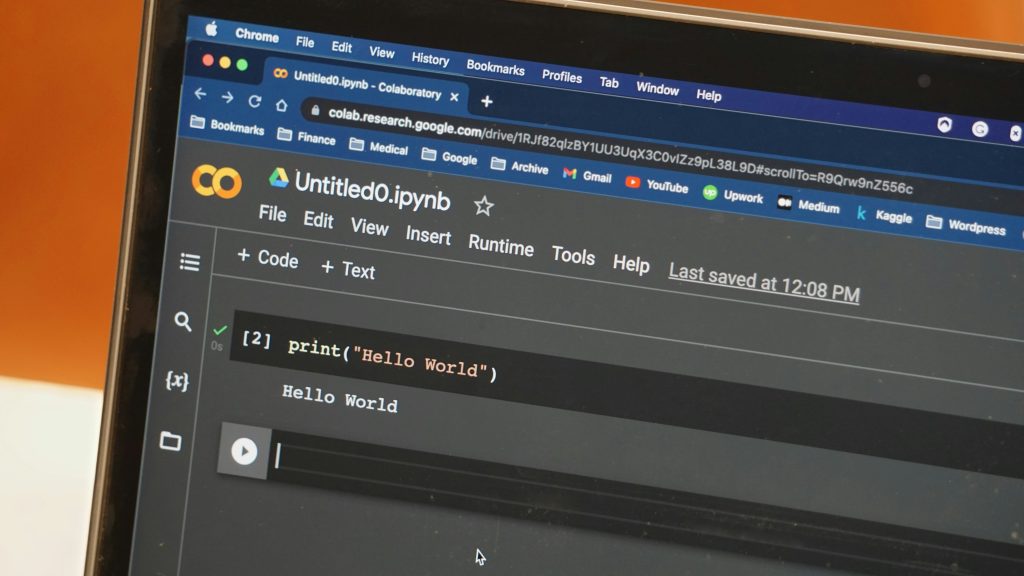
Once your setup is complete, it’s time to write your first Python program! Open your IDE or text editor and create a new file, naming it hello.py. In this file, type the following line of code:
print(“Hello, World!”)
Save the file and execute it through your terminal by navigating to the directory where your file is located and running python hello.py. You should see the output “Hello, World!” on your screen. Congratulations! You’ve just taken your first step into the world of Python programming.
Learning Python Syntax and Structure
Variables and Data Types
Variables in Python are like containers that hold data values. You can assign values to variables using the = operator. Python supports several data types, including integers, floats, strings, and lists. For instance, you can define a variable like this:
name = “Alice” age = 30 height = 5.9 friends = [“Bob”, “Charlie”, “David”]
Understanding how to use these data types effectively will form the foundation of your coding skills.
Control Structures: if, else, and loops
Control structures allow you to dictate the flow of your program based on certain conditions. The if statement helps execute a block of code when a specified condition is true. For example:
if age > 18: print(“Adult”) else: print(“Minor”)
Loops, such as for and while, let you execute a block of code multiple times. For instance, a simple for loop to print numbers could look like this:
for i in range(5): print(i)
Mastering these structures is crucial, as they enable you to implement logic in your programs.

Functions and scope
Functions in Python are blocks of reusable code that perform specific tasks. They help keep your code organized and modular. You define a function using the def keyword, like this:
def greet(name): return f”Hello, !”
You can call this function by passing an argument, like greet("Alice"). Moreover, understanding scope—whether a variable is local or global—helps you manage how data is accessed and modified throughout your code.
Error handling and exceptions
When coding, errors are inevitable. Python uses a mechanism called exceptions to handle errors gracefully. You can use try and except blocks to catch and manage those errors. For example:
try: print(1 / 0) except ZeroDivisionError: print(“Cannot divide by zero!”)
By anticipating errors and providing alternatives, you improve the robustness of your programs.
Exploring Python Libraries and Frameworks
Popular libraries: NumPy, Pandas, and Matplotlib
Python’s ecosystem boasts a rich selection of libraries that simplify complex tasks. NumPy is perfect for numerical computations, offering powerful arrays and mathematical functions. Pandas provides data structures to manipulate large datasets effortlessly, while Matplotlib enables data visualization. Exploring these libraries will equip you with the tools to perform tasks ranging from data analysis to scientific computing.
Introduction to web frameworks: Flask and Django
If you’re interested in web development, you’ll want to get familiar with frameworks like Flask and Django. Flask is lightweight and easy to use, making it ideal for simple web applications. In contrast, Django is a full-fledged framework that includes everything you need to build robust web apps, from user authentication to database management. Both frameworks have comprehensive documentation, which you’ll find helpful as you start building your web projects.
Using third-party packages with pip
To expand your projects’ capabilities, you can use third-party packages available through pip, Python’s package manager. You can easily install libraries with a single command in your terminal, such as pip install numpy. This gives you access to an abundance of resources created by the community, enabling you to enhance your Python projects significantly.
Creating virtual environments
To manage dependencies effectively for different projects, it’s essential to create virtual environments. This allows you to isolate project-specific libraries from your global Python installation. You can set up a virtual environment using the venv module by running:
python -m venv myenv
Activate it to keep your projects organized and prevent conflicts between library versions.
Building Projects to Enhance Skills
Choosing project ideas for beginners
When you’re just starting, consider simple projects that can help solidify your skills. Ideas include a basic calculator, a to-do list application, or a simple game like tic-tac-toe. The key is to pick projects that interest you so that the learning process remains enjoyable.
Working on data analysis projects
If data analysis piques your interest, consider working on projects involving datasets. You could analyze trends in various data points, visualize the results using Matplotlib, or even explore machine learning libraries like Scikit-Learn. Websites such as Kaggle offer exciting datasets and competitions that challenge your skills while providing valuable real-world experience.
Creating web applications
Building web applications can be a fantastic way to apply your coding skills. Start with a simple app using Flask to learn the MVC (Model-View-Controller) architecture. As you become more comfortable, move on to larger projects with Django to create fully-fledged applications that might interact with databases, user authentication, and more.
Participating in open source projects
Contributing to open source projects is a wonderful way to get involved in the Python community while improving your coding skills. Begin by exploring repositories on platforms like GitHub. Look for issues marked “good first issue” to ease yourself into the contribution process. Collaborating with other developers will also give you insights and exposure to coding practices you might not encounter as a solo coder.
Practicing Problem-Solving and Algorithms
Understanding algorithms and data structures
To excel at programming, it’s crucial to have a solid grasp of algorithms and data structures. Algorithms are sets of instructions for solving specific problems, while data structures are ways to organize and store data. Understanding these concepts will enhance your problem-solving skills and enable you to write more efficient code.
Solving problems on platforms like LeetCode and HackerRank
Online coding platforms such as LeetCode and HackerRank provide a plethora of problems ranging from easy to challenging. Regularly practicing on these platforms will sharpen your coding skills, improve your speed, and prepare you for technical interviews. Don’t hesitate to explore problems that challenge your understanding and expand your knowledge.

Implementing common algorithms in Python
Begin implementing common algorithms, such as sorting and searching, in Python. Not only will this solidify your understanding of how the algorithms function, but it will also give you valuable experience in coding logic. Explore more complex algorithms, like dynamic programming or graph traversal, to further elevate your skills.
Analyzing time and space complexity
Understanding time and space complexity is essential for writing efficient code. It allows you to evaluate how your code performs and scales with larger datasets. Learn to analyze algorithms using Big O notation to gain insights into their efficiency and performance characteristics, guiding you in choosing the best approach for your projects.
Version Control with Git
Introduction to version control systems
Version control systems (VCS) are essential for managing changes in your code over time. They allow you to track versions of your projects, collaborate effectively, and revert to previous stages when necessary. Git is among the most popular VCS, widely used in the software development industry.
Setting up Git and GitHub
To get started with Git, first, you need to install it on your computer. Visit the Git website, follow the installation instructions, and configure your username and email using your command line. For collaboration and hosting, sign up for GitHub, a platform that enables you to share and collaborate on code with others.
Basic Git commands
Familiarize yourself with basic Git commands, which will be invaluable in your development journey. Essential commands include:
-
git init: Initialize a new Git repository. -
git add: Stage changes for committing. -
git commit: Save your changes to the local repository. -
git push: Upload your changes to GitHub. -
git pull: Fetch and integrate changes from a remote repository.
Having a strong command over these will facilitate your version control journey.
Collaborating on projects with Git
When collaborating on projects with others, understanding branching and merging is vital. You can create separate branches for new features or fixes, allowing you and your teammates to work independently without interfering with each other’s code. Once the changes are complete and tested, you can merge the branch back into the main codebase.
Learning Best Practices in Python Development

Writing clean and readable code
Writing clean and readable code is essential for maintaining and scaling your projects. Keep your code simple, use meaningful variable names, and apply consistent formatting. Following established style guides like PEP 8 will contribute to the overall quality of your code and make it easier for others (and future you) to understand.
Understanding the Pythonic way of writing code
“Pythonic” code refers to code that leverages Python’s features and idioms neatly and efficiently. Familiarize yourself with Python’s conventions, such as using list comprehensions, leveraging built-in functions, and employing the with statement for resource management. Writing Pythonic code will keep your programming style idiomatic and friendly for fellow Python enthusiasts.
Testing and debugging methodologies
Testing your code is crucial for ensuring it works as intended. Learn about different testing frameworks, such as unittest and pytest, to help automate this process. Additionally, familiarize yourself with debugging tools and techniques, such as using breakpoints and print statements, which will allow you to troubleshoot effectively.
Using comments and documentation effectively
Effective commenting and documentation will enhance the maintainability of your code. Use comments to explain the purpose of complex code segments, while documentation strings (docstrings) in functions, classes, and modules will describe their intended usage. Maintain a well-documented codebase to foster collaboration and ease future development.
Joining the Python Community
Finding online forums and groups
Becoming an active member of the Python community can significantly enhance your learning experience. Find online forums like Stack Overflow, Reddit, or dedicated Discord servers where you can ask questions, share knowledge, and engage with others who share your passion for Python.
Attending Python meetups and conferences
Whenever possible, attend local meetups or conferences. These events provide invaluable opportunities to network, collaborate on ideas, and learn from experienced developers. Engaging in discussions can inspire you and introduce you to new concepts, frameworks, and tools.
Engaging in social media platforms
Social media platforms, such as Twitter and LinkedIn, can also serve as platforms to connect with Python developers. Follow prominent figures in the Python community, participate in discussions, and join groups related to your interests. Engaging online can expose you to a wealth of knowledge and keep you updated on industry trends.
Leveraging online resources and tutorials
Take advantage of the numerous online resources available for learning Python. Websites like Codecademy, edX, and Coursera offer structured courses, while YouTube channels provide valuable tutorials. Explore books that focus on Python programming to deepen your understanding and expand your knowledge.
Building a Portfolio and Resume
Showcasing your projects on GitHub
Creating a strong GitHub profile is essential for showcasing your coding skills. Make sure to include a variety of projects that highlight your abilities—be it web applications, data analysis projects, or automating tasks. Don’t forget to write detailed README files for each project to explain their purpose and functionality.
Creating an online portfolio website
An online portfolio serves as a digital resume that showcases your best work. You can use platforms like GitHub Pages or your web hosting service to create a simple website highlighting your projects, skills, and experiences. Include links to your GitHub projects and make it visually appealing to show off your design capabilities.
Writing an effective resume for tech jobs
When writing your resume, tailor it to highlight your Python skills and experience. Start with a strong summary that emphasizes your strengths and aspirations. List your projects and skills using quantifiable achievements when possible, and don’t overlook your educational background. Keep the format clean and professional to make a lasting impression.
Preparing for Python job interviews
Finally, preparing for job interviews is crucial. Research common questions and coding challenges related to Python programming. Practice explaining your code and thought process clearly, as interviewers appreciate candidates who can communicate their ideas effectively. Mock interviews with friends or through platforms like Pramp can also build your confidence.
Conclusion
Recap of the 4 steps
To become a proficient Python programmer, remember these essential steps: understand the basics of Python, delve into its syntax and structure, explore relevant libraries and frameworks, and finally, build projects to enhance your skills. Each step builds upon the last and contributes to your overall understanding and capabilities as a programmer.
Encouragement to start coding
Don’t wait too long to start coding—dive in today! The best way to learn is through practice, so explore simple projects, tackle coding challenges, and experiment with different libraries. Your journey in Python programming will be filled with discovery, excitement, and growth.
The importance of practice and perseverance
Becoming proficient in Python requires practice and perseverance. Don’t be disheartened by setbacks or challenges; learning to code is a process. Embrace the difficulties and let them fuel your determination. Remember, every programmer went through the same journey, and persistence is key to success.
Final thoughts on pursuing a career in Python programming
Pursuing a career in Python programming can open up many opportunities for you. Whether you aim to develop web applications, analyze data, or develop artificial intelligence systems, Python’s versatility and community support make it an excellent choice. So, take this knowledge, get coding, and enjoy the journey towards becoming a confident Python developer!