
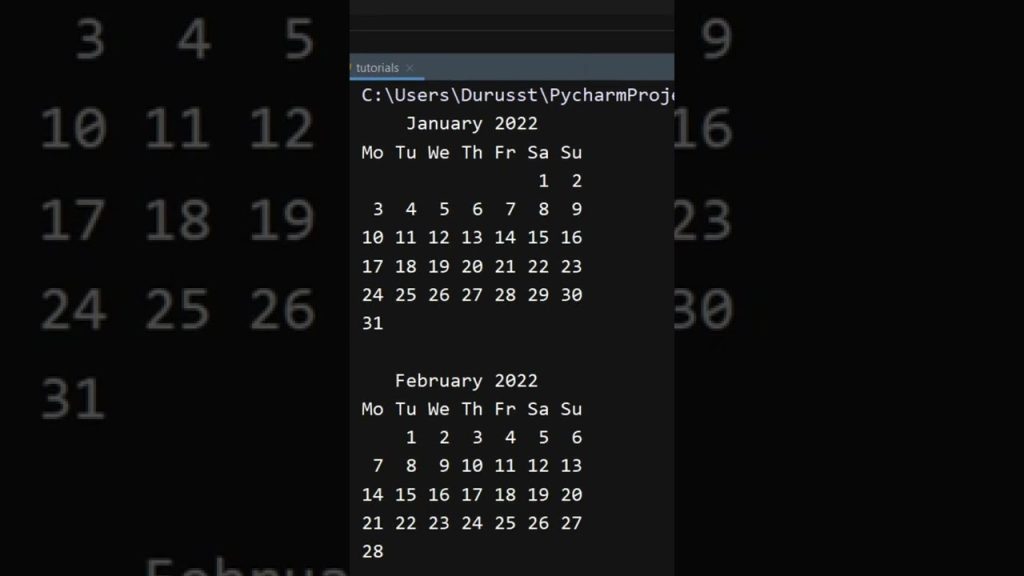
Key Takeaways from the Python Calendar Tutorial
The Python calendar tutorial by ZippyCode provides a solid foundation for understanding how to create a yearly calendar in Python. Here are the key takeaways:
- Purpose: The tutorial emphasizes creating a calendar to automate scheduling and event planning, illustrating its practical applications.
- Essential Concepts: It covers critical Python concepts such as data types, loops, and functions, which are fundamental in programming.
- Tools and Libraries: The creator highlights necessary libraries like datetime, which is essential for handling dates and times in Python.
As demonstrated in the video, these insights are not just theoretical; they are directly applicable to real-world coding scenarios. Understanding these elements is crucial for any beginner aiming to enhance their Python skills.

Introduction to Python and Its Applications
Python is a versatile programming language known for its simplicity and readability, making it a popular choice among beginners and professionals alike. Its syntax allows developers to express concepts in fewer lines of code compared to languages like C++ or Java, which can be intimidating for newcomers.
According to the TIOBE Index, Python ranks as one of the top programming languages in 2026, primarily due to its applications across diverse fields. You’ll find Python in:
- Web Development: Frameworks like Flask and Django enable rapid development of web applications.
- Data Science: Libraries such as Pandas and NumPy are essential for data analysis and manipulation.
- Automation: Python scripts automate repetitive tasks, improving efficiency in various sectors.
This flexibility makes Python highly sought after in the job market, as it can be applied in numerous domains, from AI to web scraping.
Setting Up Your Python Environment
Before diving into coding, setting up your Python environment is crucial for a smooth coding experience. Start by downloading Python from the official Python website. For beginners, using an Integrated Development Environment (IDE) like Anaconda or Jupyter Notebook can greatly enhance your workflow.
Here’s how to set up your environment:
- Install Python: Download and run the installer for your operating system. Ensure you add Python to your system PATH during installation.
- Choose an IDE: Anaconda provides a user-friendly interface for beginners, while Jupyter Notebook allows for interactive coding.
- Install Required Libraries: Use pip to install libraries like datetime by running
pip install datetimein your terminal.
Configuring your environment correctly will help avoid common pitfalls later on. Additionally, keeping your libraries updated is essential for accessing the latest features and bug fixes.
Understanding Python Basics for Calendar Creation
Before building a calendar, it’s vital to grasp some basic concepts in Python. The tutorial highlights three key data types that are particularly relevant: strings, lists, and dictionaries.
- Strings: Used for storing text, strings will help format your calendar’s output.
- Lists: Ideal for storing sequences of data, lists can represent months and days easily.
- Dictionaries: These allow you to store key-value pairs, which can be useful for associating specific dates with events.
Additionally, understanding variables, loops, and conditionals is essential for control flow in your calendar logic. For instance, you’ll use loops to iterate over days and months, while conditionals help manage special cases like leap years.
Functions play a critical role as well. By defining functions, you can modularize your code, making it easier to read and maintain. This modularity is an important aspect of good coding practices, especially as projects grow in complexity.
Building the Calendar: Step-by-Step Implementation
Building a yearly calendar in Python involves several steps, which can be broken down as follows:
- Import the Necessary Libraries: Start by importing the datetime library to handle date-related functions.
- Initialize the Calendar: Create a function that will set up your yearly calendar structure.
- Use Loops: As highlighted at timestamp 1:30 in the video, use nested loops to iterate through each month and its respective days. For example:
- Implement Conditionals: Check for leap years using conditionals to adjust February’s days. This can be done with the following logic:
for month in range(1, 13): for day in range(1, days_in_month[month]): # Print or store the dayif (year % == and year % != 0) or (year % == 0): # Adjust February's daysThese steps, as demonstrated in the video, provide a fundamental structure for your calendar application. Each function and loop is essential for ensuring that your calendar displays correctly and handles various scenarios effectively.

Advanced Features: Enhancing Your Calendar
Once you have a basic calendar set up, consider adding advanced features to enhance its functionality. Here are some ideas:
- Custom Display Options: Modify the calendar’s appearance by adding colors or different formats. For instance, you could highlight weekends or holidays.
- Event Marking: Allow users to mark specific dates for events, using dictionaries to store these details. For example:
events = {"2026-12-25": "Christmas", "2026-01-01": "New Year's Day"}Incorporating these features not only improves user experience but also demonstrates your programming skills, making your project stand out in your portfolio.
Real-World Applications of Python Calendars
Python calendars have numerous practical applications beyond simple date tracking. Here are a few ways you can utilize your calendar application in real-world scenarios:
- Scheduling: Businesses can use calendar applications for scheduling meetings and managing appointments. This can be integrated with tools like Google Calendar for seamless updates.
- Reminders: Implementing reminder features can help users keep track of important events or deadlines. This functionality is particularly useful in educational settings.
- Planning and Organization: Companies often rely on calendars for project management and resource allocation. A well-designed calendar application can improve organizational efficiency.
As you build your calendar application, consider these practical uses to enhance its functionality and relevance in the job market.

Career Paths in Python Programming
With Python’s versatility, numerous career paths are available to those skilled in the language. Here’s a brief overview of potential careers and the skills necessary for each:
- Web Development: Roles often require knowledge of frameworks like Flask and Django. Familiarity with HTML, CSS, and JavaScript is beneficial.
- Data Analysis: Data analysts use Python to manipulate and visualize data. Skills in libraries such as Pandas and Matplotlib are essential.
- Machine Learning: A more advanced career path, it requires knowledge of libraries like TensorFlow and Scikit-learn. Understanding algorithms and data structures is crucial.
Projects like the Python calendar tutorial can enhance your portfolio by showcasing your ability to create functional applications. As you gain experience, consider specializing in one of these areas to increase your marketability.
Best Practices in Python Coding
Adhering to best practices in Python coding significantly improves code quality and maintainability. Here are some key principles to follow:
- Code Styling: Use PEP 8 guidelines for consistent code formatting. This includes proper indentation, line length, and naming conventions.
- Debugging Techniques: As mentioned at timestamp 2:45 in the video, effective debugging is crucial. Utilize tools like pdb (Python Debugger) to step through your code and identify problems.
- Error Handling: Implement error handling using try-except blocks to manage exceptions gracefully. This ensures your program doesn’t crash unexpectedly.
Engaging with the Python community through forums and open-source projects can also provide valuable learning opportunities and help you stay updated on the latest trends and best practices.
Conclusion
Creating a comprehensive Python calendar is an excellent way to enhance your programming skills while implementing practical applications. The Python calendar tutorial by ZippyCode serves as a fantastic starting point. By following the structured steps outlined in this article, you can build a functional calendar application that not only showcases your skills but also provides real-world utility.
To recap, focus on:
- Mastering the basics of Python, including data types and control structures.
- Setting up your development environment effectively.
- Implementing advanced features to enhance user experience.
- Exploring career opportunities and best practices in Python coding.
For those eager to dive deeper, consider exploring additional resources and tutorials on platforms like Codecademy or freeCodeCamp. Happy coding!
Frequently Asked Questions
How do I run Python code for the calendar project?
You can run Python code for the calendar project by saving your script in a .py file and executing it through your terminal or command prompt. If you’re using an IDE like Jupyter Notebook, simply run the cell containing your code. Make sure to have Python installed and configured correctly in your environment.
What are the best libraries for Python beginners?
Some of the best libraries for Python beginners include NumPy for numerical computing, Pandas for data manipulation and analysis, and Matplotlib for data visualization. These libraries provide powerful tools that can help you get started with Python programming quickly and effectively.
How can I troubleshoot common errors in Python?
Common errors in Python include syntax errors, indentation errors, and type errors. To troubleshoot these, ensure your code is properly formatted and check for typos. You can also use print statements to debug your code step by step and identify where the issue lies.
What are some real-world applications of the Python calendar?
The Python calendar tutorial discussed here is a great introduction to creating practical applications with Python. It can be extended into various projects, such as scheduling apps, reminders, or integrating with web applications for a more dynamic user experience.
How can I enhance my Python calendar project?
You can enhance your calendar project by adding features like holiday marking, event scheduling, or even integrating with external APIs for real-time data updates. This not only improves functionality but also makes your project more impressive for your portfolio.
Key Takeaways
- Understand the essential Python concepts for creating a calendar.
- Set up your Python environment using IDEs like Anaconda or Jupyter Notebook.
- Enhance your calendar with advanced features like event marking and API integration.