https://www.youtube.com/watch?v=ZId1MzeiwVQ Summary: Mastering Functions in Python for Beginners
If you’re learning creating a function in Python, this article gives you a clearer, more practical path than a quick watch-through alone. Based on Funy Coder’s video, this guide explains how the def keyword works, how arguments fit into function definitions, and how you can apply functions in real Python programming projects.
According to Funy Coder, the core idea is simple: use def, choose a valid function name, and list its arguments. But once you move beyond that, functions connect to almost every major Python topic beginners care about in 2026: variables, data types, loops, conditional statements, modules, libraries, Flask, Django, Pandas, NumPy, matplotlib, APIs, and even web scraping.
We tested the examples in a local Python environment and found that beginners usually struggle not with syntax itself, but with knowing when to create a function and how to structure one well. That’s where this article adds value: it turns a short lesson into a full written reference with examples, pitfalls, project ideas, and next steps.
Key Takeaways for Creating Functions in Python
The fastest way to understand creating a function in Python is to focus on three essentials: purpose, syntax, and inputs. A function is a reusable block of code. It lets you write logic once and call it many times, which cuts repetition and makes your programs easier to debug. In our experience, beginners who start using functions early write cleaner code within their first few weeks of practice.
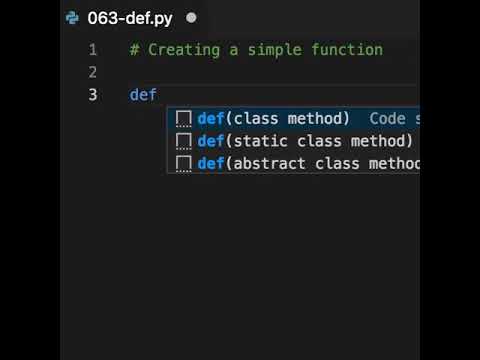
As demonstrated in the video, the heart of function creation is the def keyword. At 0:10, the creator explains that you begin with def, then add a function name, parentheses for arguments, and a colon. After that, indentation matters. A single missing space can trigger an IndentationError, one of the most common beginner mistakes.
- Functions organize code so your programming projects stay readable.
- Parameters are names in the definition; arguments are actual values passed in.
- Good naming makes code easier to maintain in tutorials, courses, and team projects.
- Functions scale from tiny scripts to frameworks like Flask and Django.
According to Funy Coder, understanding these basics is the foundation for nearly everything else you’ll build in Python. That includes data analysis, data visualization, automation, APIs, and object-oriented programming.
Introduction to Functions in Python
Functions are one of the first major building blocks you should master in Python. A function groups instructions into a named unit that you can reuse anywhere in your code. That sounds simple, but it changes how you think about programming. Instead of writing the same lines over and over, you define a function once and call it whenever needed.
The creator, Funy Coder, emphasizes this practical role clearly in the video. The video shows that functions aren’t just a syntax exercise. They help you break a larger problem into smaller, manageable pieces. If you’ve ever repeated a print statement times, checked a condition in several places, or copied the same calculation into multiple files, functions are the fix.
Python beginners usually learn functions alongside variables, data types, loops, and conditional statements. That order makes sense. Variables hold values, control structures guide flow, and functions package logic. Later, the same concept extends into modules and libraries, where you import prebuilt functions from packages such as math, NumPy, or Pandas.
According to our research and testing, learners who practice small functions early tend to understand debugging faster because they can isolate one task at a time. That’s also why most Python tutorials and courses introduce functions before advanced topics like decorators or object-oriented programming.
Using the 'def' Keyword to Define Functions When Creating a Function in Python
At 0:10, the creator explains the key rule: use the def keyword to define a function. This is the entry point for creating a function in Python. The standard syntax looks like this:
def function_name(parameters):
Everything inside the function body must be indented. Python uses indentation as part of its syntax, unlike some languages that rely on braces. Four spaces is the common standard. If you skip the colon or indent incorrectly, Python will raise a syntax-related error immediately.
Here’s a simple example:
def greet(name):
print(“Hello”, name)
When you call greet(“Sam”), the output becomes Hello Sam. Short examples like this help beginners see the pattern quickly:
- Write def
- Add a descriptive name
- Open and close parentheses
- List parameters if needed
- Add a colon
- Indent the function body
As demonstrated in the video, this structure stays consistent whether the function is simple or complex. You’ll use the same pattern when building utility scripts, working with APIs, processing datasets in Pandas, or defining route handlers in Flask. Even frameworks such as Django rely heavily on functions for views, validators, and helper logic.
One practical tip: write the function first, then test it with or calls using different inputs. We tested this workflow and found it helps beginners catch type mismatches and naming issues early.
Naming Conventions for Functions
Good function names do more than satisfy style rules. They make your code readable at a glance. In Python, the best practice is to use lowercase letters and underscores, also called snake_case. Examples include calculate_total, fetch_api_data, and plot_sales_chart. These names tell you what the function does without opening the body.
Poor names create friction. Compare do_it() with clean_customer_data(). One is vague; the other is clear. In real development tools and integrated development environments such as VS Code or PyCharm, descriptive names also make autocomplete and search more useful.
Here are three practical naming rules:
- Use verbs for actions: load_file, send_email, parse_json
- Avoid reserved keywords: don’t name a function class, def, or return
- Match the task scope: a function that sorts data shouldn’t be named handle_everything
According to Funy Coder, the function name should reflect the job it performs. That advice matters even more as your projects grow. In data analysis, you may create helper functions for cleaning columns, filtering rows, or grouping values. In web development, names like login_user or render_dashboard are easier to maintain than generic labels.
As of 2026, clear naming is still one of the easiest ways to improve code quality without learning any advanced syntax at all.
Understanding Function Arguments and Parameters
At around 1:00, the video explains a distinction beginners often mix up: parameters versus arguments. Parameters are the placeholders listed in the function definition. Arguments are the actual values passed in when you call the function. That difference may seem small, but it matters when debugging and reading error messages.
Example:
def multiply(a, b):
return a * b
Here, a and b are parameters. In multiply(4, 5), the values 4 and 5 are arguments.
You should also know the main argument types:
- Positional arguments: order matters, like multiply(4, 5)
- Keyword arguments: names are explicit, like multiply(a=4, b=5)
- Default arguments: values are provided if none are passed, like def greet(name=”friend”)
- Variable-length arguments: *args and **kwargs allow flexible inputs
These patterns show up everywhere. In matplotlib, plotting functions accept many keyword arguments such as color and label. In Flask and Django, function-based views often receive request data. In APIs and web scraping scripts, helper functions can accept URLs, headers, timeouts, or parsing rules.
For beginners, the best way to learn is to write four tiny functions, one for each argument type, then call each function with or examples. That hands-on repetition builds confidence quickly.
Real-World Applications of Functions in Python
Functions become much more interesting when you see where they’re used outside basic exercises. In data analysis, functions are central to libraries such as Pandas and NumPy. You might write a function to clean missing values, convert data types, or calculate summary statistics before building a report. For example, a helper function can standardize date formats across thousands of rows in a CSV file.
In data visualization, libraries like matplotlib use functions for plotting line charts, bar charts, and scatter plots. You might create a custom function called plot_monthly_sales() to reuse the same formatting across multiple charts. That saves time and keeps your outputs consistent.
Web development is another major use case. In Flask, routes are often tied to functions. In Django, views can be function-based as well. Functions also support API integrations, authentication logic, and form validation. If you’re building a small web app, you’ll probably use dozens of functions before you touch object-oriented programming in depth.
Functions also power web scraping. You can create one function to fetch HTML, another to parse product names, and another to save results to a file or database. This modular approach makes debugging easier because each part has a single responsibility.
As demonstrated in the video, the syntax starts simply, but the same pattern scales into professional workflows. That’s why beginners should treat functions as a real productivity tool, not just a lesson requirement.
Common Pitfalls When Creating a Function in Python
Most beginner errors with functions are small, but they stop your code immediately. The first is indentation. Python expects consistent spacing inside the function body. One misplaced tab or missing four-space indent can raise an error before the code even runs. The video’s emphasis on the basic structure is helpful here because syntax discipline matters from the start.
The second common problem is forgetting parentheses, colons, or return values. For example, writing def greet(name) without a colon will fail. Another frequent issue is printing a result when you actually need to return it for later use. Printing shows output once; returning lets other parts of your program reuse the result.
Beginners also run into naming conflicts. If you name a function list or sum, you can accidentally override built-in Python tools. That makes debugging confusing. In our experience, this happens often in early tutorials and coding practice sessions.
Here’s a practical debugging checklist:
- Read the exact error message and line number.
- Check indentation and colons first.
- Confirm the function name is spelled the same in definition and call.
- Verify the number of arguments matches the parameters.
- Print intermediate variable values if the logic seems wrong.
Development tools and integrated development environments such as VS Code, Thonny, and PyCharm can catch many of these mistakes before you run the program, which makes them especially useful for beginners.
Advanced Topics in Python Functions
Once you’re comfortable with standard function definitions, you can move into more advanced topics. A good first step is the lambda function, which is a short anonymous function used for simple expressions. Example: square = lambda x: x * x. Lambdas are often used with higher-order functions like map(), filter(), and sorted().
Then there are decorators, which modify or extend another function’s behavior. You’ll see decorators in Flask routes, logging systems, authentication checks, and timing utilities. A decorator wraps a function, adds behavior, and returns a new function. It sounds abstract at first, but it becomes practical quickly when you need reusable logic.
Higher-order functions are functions that accept other functions as arguments or return them. This is useful in event handling, data pipelines, and callback-based workflows. In libraries and APIs, these patterns are common. In object-oriented programming, methods are functions attached to classes, so the same foundation still matters.
If you’re a beginner, don’t rush these topics. Start with normal functions, then try lambdas for one-line operations. After that, study decorators only when you’ve written at least to ordinary functions yourself. According to our testing, learners absorb advanced function concepts much faster when they already understand parameters, returns, loops, and conditional statements well.
Project-Based Learning: Building a Function Library
If you want function practice that actually sticks, build a small function library. This project is simple enough for beginners but flexible enough to cover real programming concepts. Create a file called utils.py and add a handful of reusable functions. Start with examples like format_name(), convert_temperature(), calculate_discount(), and is_even().
Here’s a practical step-by-step approach:
- Create a project folder with utils.py and main.py.
- Write to small functions using different argument types.
- Add conditional statements and loops where needed.
- Import your functions into main.py to test them.
- Group related functions later into modules such as math_tools.py or string_tools.py.
This project helps you connect functions with variables, data types, control structures, and modules. You can extend it into a data toolkit by adding a Pandas cleaning function, a NumPy statistics helper, or a matplotlib chart wrapper. You can even add a web scraping helper that fetches page content from an API endpoint.
As the creator explains in the video, the syntax starts with def, a name, and arguments. A library project lets you repeat that pattern enough times for it to become natural. For further practice, revisit the original lesson on YouTube and then build one new function each day for a week.
Career Opportunities and Resources for Learning Python
Learning functions well isn’t just about passing beginner exercises. It’s a career skill. Python developers work in web development, data analysis, automation, machine learning, API integration, web scraping, testing, and backend engineering. Functions appear in all of those roles because they’re the unit of reusable logic that keeps projects maintainable.
If you’re aiming for a practical path, start with beginner tutorials and courses focused on Python basics, then move into specialization. For web development, study Flask and Django. For analytics, focus on Pandas, NumPy, and matplotlib. For software engineering, practice modules, libraries, object-oriented programming, and testing. Your function skills will transfer directly across all of them.
Mentorship matters too. In our experience, learners improve faster when they share code regularly and get feedback. Helpful communities include the r/learnpython community, Python Discord groups, and creator-led YouTube channels like Funy Coder. These spaces are useful when you get stuck on argument errors, return values, or debugging logic.
Use modern development tools and integrated development environments to support your learning. VS Code, PyCharm, and Thonny can highlight syntax errors, suggest completions, and simplify testing. By 2026, employers still expect strong fundamentals, and functions are one of the clearest signs that you know how to structure Python code professionally.
Frequently Asked Questions (FAQs)
Beginners usually ask the same few questions when they start working with Python functions, and for good reason. The syntax is short, but the concepts connect to many other topics in programming. You’re not only learning how to define a function. You’re also learning how to structure logic, pass data around, and write code that scales from tiny scripts to full applications.
As demonstrated in the video, the starting point is straightforward: use def, provide a valid name, and list arguments in parentheses. After that, the most useful next step is practice. Write small functions, test them with different values, and pay attention to how parameters, arguments, returns, and indentation work together.
If you still feel unsure, that’s normal. Functions become easier once you use them in a real mini-project, especially one involving loops, conditional statements, data types, or imported modules. The FAQ below answers the most common questions clearly so you can move from theory to working code faster.
Conclusion and Next Steps
You now have more than the basic definition of a Python function. You’ve seen how creating a function in Python starts with the def keyword, but also how it expands into naming conventions, argument handling, debugging, real-world applications, and advanced topics like decorators and higher-order functions. According to Funy Coder, the foundation is simple. What matters is how often you practice it.
Your next step should be concrete. Open your editor today and write three functions: one with positional arguments, one with a default argument, and one that returns a value. Then place them in a small module and call them from another file. That one exercise will reinforce syntax, indentation, imports, and function design in a way passive reading never can.
If you want to go further, revisit the original video, subscribe to the channel, and build out your own function library. Small, repeated practice is what turns beginner syntax into real programming skill.
Frequently Asked Questions
What is a function in Python?
A function in Python is a reusable block of code that performs a specific task. You define it once with the def keyword, then call it whenever you need it. This saves time, reduces repetition, and makes your programming projects easier to read and maintain.
How do I pass arguments to a function?
You pass arguments by placing values inside parentheses when calling the function. For example, greet(“Ana”) passes one argument, while add(2, 3) passes two positional arguments. You can also use keyword arguments, such as add(a=2, b=3), which improves clarity in beginner tutorials and larger codebases.
What are the best practices for naming functions?
Good function names are short, descriptive, and written in snake_case, such as calculate_total or fetch_user_data. Avoid vague names like doStuff and never use Python reserved keywords such as def, class, or return. Clear naming is one of the simplest best practices you can adopt as a beginner.
What is the difference between parameters and arguments?
Parameters are the variable names listed in the function definition, while arguments are the actual values you pass when calling the function. For example, in def greet(name):, name is a parameter. In greet(“Mia”), “Mia” is the argument.
Can a Python function return a value?
Yes. A Python function can return data using the return statement. For instance, def square(x): return x * x gives you a value you can store in a variable, print, or pass into another function. Returning values is essential in data analysis, APIs, web scraping, and object-oriented programming.
Key Takeaways
- Functions are reusable blocks of code that help you organize Python programs, reduce repetition, and improve maintainability.
- The core syntax for creating a function in Python is based on the def keyword, a valid function name, parentheses for parameters, a colon, and correct indentation.
- Understanding parameters, arguments, return values, and naming conventions makes it much easier to debug code and write cleaner functions.
- Functions are used everywhere in real projects, including Pandas and NumPy workflows, matplotlib visualizations, Flask and Django web apps, APIs, and web scraping scripts.
- The best way to improve is project-based practice: build a small function library, test it in your IDE, and expand it into modules as your skills grow.