
In the world of programming, learning to print patterns can be an exciting first step for beginners. This article will guide you through the basics of generating specific designs using Python, perfect for those just starting their coding journey. Along the way, you’ll discover tips and tricks that make the process both enjoyable and straightforward.
You’ll find step-by-step instructions that simplify the printing of patterns, making it easier to grasp the concepts of loops and functions. By the end, you’ll have a deeper understanding of how Python works while creating visually appealing outputs that showcase your new skills. Embrace the challenge and watch your programming proficiency grow!
Understanding Patterns in Programming
What are Patterns?
Patterns in programming refer to repeated structures or sequences that create specific outputs based on defined input values. These can come in various forms, such as shapes, numbers, or symbols. They are an essential concept in programming as they teach you how to write clear and efficient code. In languages like Python, you have the ability to create visual representations of these patterns using loops and functions. Get ready to dive into the fascinating world of programming patterns and unlock your coding creativity!
Importance of Pattern Printing in Programming
Printing patterns is often one of the first exercises you’ll encounter when learning to program. This is not merely a tradition; it’s an effective way to grasp fundamental programming concepts including loops, control flow, and functions. By mastering pattern printing, you develop problem-solving skills and enhance your understanding of algorithm efficiency. As you continue to progress in your programming journey, these foundational skills will serve you well in tackling more complex coding challenges.
Common Patterns Used in Python
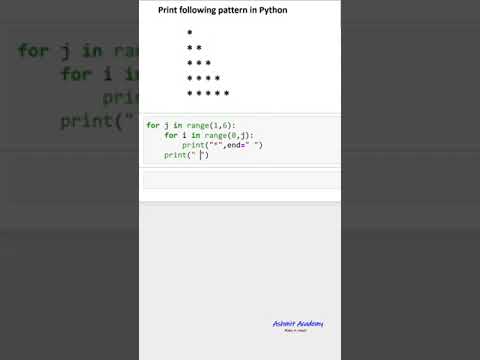
When it comes to pattern printing in Python, some of the most common types include star patterns, numeric triangles, and various shapes like squares and diamonds. Each of these patterns offers unique opportunities to practice different coding concepts. For instance, you may start with a simple triangle made of asterisks and then move on to more complicated designs such as hollow squares or diamond shapes. The versatility of Python allows you to bring these patterns to life with relatively simple code structures, making learning both enjoyable and effective.
Basics of Python Programming
Introduction to Python Syntax
Python is celebrated for its readable and straightforward syntax. When you start writing Python code, you’ll notice that it emphasizes clarity and simplicity, making it an excellent choice for beginners. For instance, a traditional print statement looks like this: print("Hello, World!"). Understanding the syntax is foundational, as it ensures that your code is both functional and easy to read. This readability makes collaboration and debugging less daunting, which is crucial, especially when learning.
Data Types and Variables
In Python, data types are the classification of data that tells you what kind of value a variable can hold. You’ll typically encounter basic data types such as integers, floats, strings, and booleans. For example, you can declare a variable to hold an integer like this: my_number = 5. Variables are essential as they allow you to store and manipulate data within your programs. Familiarizing yourself with these data types will help you understand how to manage different kinds of information, paving the way for more complex operations.
Control Structures in Python
Control structures are the building blocks that allow you to dictate the flow of your program. The most common control structures in Python are conditional statements (if, else), loops (for, while), and functions. Understanding these will empower you to make decisions within your code based on certain conditions, repeat tasks efficiently, and organize your code into reusable segments. Mastery of control structures is crucial to writing effective and maintainable code.
Setting Up Your Python Environment
Installing Python
Before you can start coding, you need to set up your Python environment. You can download Python from the official Python website and follow the installation instructions for your operating system. Make sure to check the box that adds Python to your system PATH, which will make it easier to run Python scripts from the command line. Once installed, you can verify the installation by opening a command prompt or terminal and typing python --version, which should display the installed version of Python.
Choosing an IDE or Text Editor
Choosing the right Integrated Development Environment (IDE) or text editor can significantly enhance your coding experience. Some popular IDEs for Python include PyCharm, Visual Studio Code, and Jupyter Notebook. They offer features such as syntax highlighting, code completion, and debugging tools that make coding more manageable. Alternatively, you might choose a simple text editor like Sublime Text or Atom if you prefer a more minimalist environment. Ultimately, the best choice is one that you find comfortable and suits your coding needs.
Running Your First Python Program
Now that your environment is ready, it’s time to run your first Python program! Open your IDE or text editor, create a new file, and type in the following code:
print(“Hello, World!”)
Save the file with a .py extension (for example, hello.py). If you’re using a terminal, navigate to the file’s directory and run the command:
python hello.py
You should see “Hello, World!” printed to your screen. Congratulations! You’ve just executed your first Python script, marking the first step on your exciting programming journey.
Understanding Loops
What are Loops?
Loops are fundamental structures in programming that allow you to execute a block of code repeatedly based on a condition. They are particularly useful for tasks that involve repetitive actions, such as iterating through lists or generating patterns. By using loops effectively, you can reduce code redundancy and improve efficiency. In Python, you will primarily work with two types of loops: for loops and while loops. Each has its unique use cases and advantages.
Types of Loops in Python
Python provides two primary loop constructs: for loops and while loops. A for loop is typically used for iterating over a sequence (like a list or a string) and executes a block of code for each item. Here’s a simple example:
for i in range(5): print(i)
In contrast, a while loop continues to execute a block of code as long as a specified condition is true. For instance:
count = 0 while count