
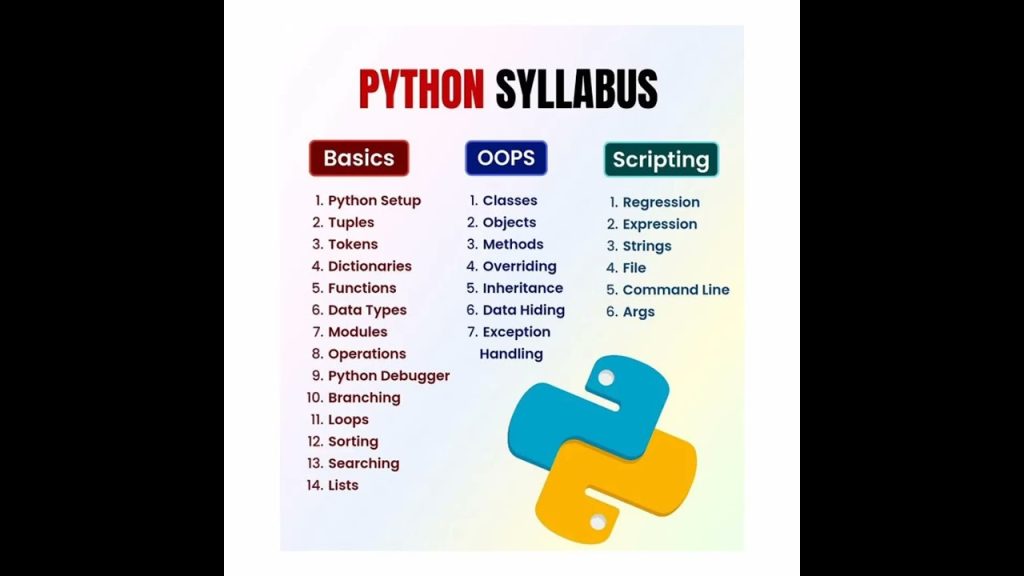
Embarking on your Python journey opens the door to a world full of possibilities in programming. This article presents a comprehensive syllabus designed specifically for beginners, making the learning process engaging and straightforward. With guidance from SHRAY SALVI, you’ll explore foundational concepts, practical applications, and essential coding skills that will empower you to tackle real-world challenges.
Throughout this course, expect to master the basics of Python programming in an enjoyable and structured manner. Each section builds on the last, ensuring a smooth learning experience that enhances your understanding and confidence in coding. Whether you’re preparing for a career in technology or simply looking to expand your knowledge, this complete Python course is tailored to help you succeed.
Python Programming Guide
Introduction to Python
What is Python?
Python is a versatile, high-level programming language that emphasizes code readability. You can use it for various tasks, from simple scripting to complex web applications. What makes Python particularly appealing is its clean syntax, which allows you to express concepts in fewer lines of code compared to other languages. This means you can focus more on solving problems rather than worrying about intricate syntax details.
History and Evolution of Python
Python was created in the late 1980s by Guido van Rossum and was first released in 1991. The name “Python” actually comes from the British comedy group Monty Python, as Guido wanted to make programming fun. Over the years, Python has evolved significantly, with major versions like Python 2.0 released in 2000 and Python 3.0 in 2008. Each version has improved functionality, added features, and resolved inconsistencies found in earlier versions.
Features of Python
One of the standout features of Python is its simplicity. You’ll find that its syntax is close to the English language, making it easy to learn, especially if you’re a beginner. Python supports multiple programming paradigms, including procedural, object-oriented, and functional programming. It has a rich set of libraries and frameworks that make it suitable for web development, data analysis, artificial intelligence, and more. Python also boasts extensive community support through forums and documentation, which makes finding solutions easier.
Applications of Python
The versatility of Python allows you to use it in a wide range of applications. You can build web applications with frameworks like Django and Flask, automate tasks with its scripting capabilities, analyze data with libraries like Pandas and NumPy, and create machine learning models using TensorFlow and Scikit-learn. Additionally, Python is widely used in scientific computing, game development, and even in the emerging fields of Artificial Intelligence and Machine Learning.
Setting Up the Python Environment
Installing Python on Windows
To get started with Python on Windows, the first step is to download the installer from the official Python website. Once the download is complete, run the installer, making sure to check the box that says “Add Python to PATH.” This allows you to run Python from the command line. Follow the installation prompts, and you’re good to go! You can verify your installation by opening the Command Prompt and typing python --version.
Installing Python on MacOS
If you’re using MacOS, Python is often pre-installed. However, it’s wise to install the latest version. You can easily download it from the Python website. Alternatively, consider using Homebrew, a package manager for Mac, which allows you to install Python by simply typing brew install python in the terminal. Verify your installation by typing python3 --version to see if the latest version is set up.
Installing Python on Linux
For Linux users, the installation process may vary slightly based on your distribution. Most distributions come with Python pre-installed. To install or update Python, you can use your package manager. For Ubuntu, for example, you’d type sudo apt-get install python3. After the installation, check the version by typing python3 --version in your terminal.
Setting Up an Integrated Development Environment (IDE)
To make coding in Python easier, consider setting up an Integrated Development Environment (IDE). Some popular options include PyCharm, Visual Studio Code, and Jupyter Notebook. Each IDE provides features like syntax highlighting, debugging tools, and an interactive console. PyCharm is known for its robust features tailored for Python development, while Visual Studio Code is lightweight and supports various programming languages.
Basic Python Syntax and Data Types
Understanding Python Syntax
One of the first things you’ll notice when you start coding in Python is its clean and straightforward syntax. Python uses indentation to define blocks of code, which is different from languages that use braces. This approach keeps your code tidy and emphasizes readability. A simple print statement looks like this: print("Hello, World!"). As you practice, you’ll appreciate how this style allows you to focus more on problem-solving.
Variables and Constants
In Python, you can create variables to store data that can change, such as user input or computed values. For example, my_variable = 10 stores the integer 10 in a variable named my_variable. To define constants, you can write in uppercase, like PI = 3.14, although Python doesn’t enforce immutability. It’s a common convention to treat variables in uppercase as constants.
Basic Data Types: Integers, Floats, Strings, and Booleans
Python has several basic data types, which you’ll frequently use in your programs. Integers (int) are whole numbers, while floating-point numbers (float) can have decimals. Strings (str) are sequences of characters enclosed in quotes, and Booleans (bool) have two possible values: True and False. Familiarizing yourself with these data types will help you manage data effectively in your applications.
Type Conversion in Python
Type conversion, or typecasting, allows you to convert one data type to another. For example, you can convert an integer to a float using float(10) or a string to an integer with int("5"). Keep in mind that you can only convert strings that represent numeric values to integers or floats. Understanding type conversion is helpful to avoid errors when performing operations with different data types.
Control Structures in Python
Conditional Statements: if, elif, else
Conditional statements allow you to execute code based on certain conditions. The if statement checks a condition and executes the block of code if it’s true. You can use elif (else if) to check multiple conditions, and else for when none of the previous conditions are met. For example:
age = 18 if age