
Exploring the world of programming can feel daunting, especially for someone just starting out. Python, a popular language renowned for its simplicity and versatility, offers a great entry point for beginners. This article outlines the fundamentals of Python, its significance in the tech industry, and practical steps to kick off your coding journey, including installation, creating project folders, and mastering the basics.
You’ll discover what sets Python apart from other programming languages and why its supportive community makes learning it enjoyable and effective. From understanding core concepts to debugging your code, you’ll gain insights that can pave the way for your growth in programming. Whether you’re aiming to build websites, automate tasks, or analyze data, these foundational skills can set you on a path to success in the ever-evolving tech landscape.
Understanding Python
Definition of Python
Python is a high-level programming language that is renowned for its readability and simplicity. Designed to be intuitive, Python allows developers to express concepts in fewer lines of code than many other programming languages. It’s an open-source language, which means that anyone can use, modify, and distribute it freely, fostering a collaborative atmosphere in the programming community.
History and Development
Python was created by Guido van Rossum and was first released in 1991. Its initial design aimed to make coding as straightforward and clear as possible, drawing inspiration from existing languages like ABC, Modula-3, and C. Over the years, Python has seen numerous updates, resulting in robust features that cater to various applications, from web development to data analysis. With a strong community backing, Python has become one of the leading programming languages globally.
Key Features of Python
A few key features make Python incredibly popular among developers:
- Readability: Python’s syntax is simple and clean, making it easy to read and write.
- Versatility: Whether you want to create a website, automate tasks, or perform data analysis, Python can do it all.
- Extensive Libraries: Python offers a rich set of libraries and frameworks, such as Django for web development and Pandas for data analysis.
- Cross-Platform Compatibility: You can run Python on various operating systems, including Windows, macOS, and Linux without any modifications.
Importance of Learning Python
Popularity in the Programming Community
You’ll find that Python has skyrocketed in popularity and is often regarded as one of the best programming languages to learn. According to various surveys, Python consistently ranks among the top languages used by developers. This popularity means a wealth of resources, libraries, and community support are available, making your learning journey smoother and more enjoyable.
Ease of Use for Beginners
As a beginner, you may feel overwhelmed when confronting programming languages. Thankfully, Python is designed to reduce this barrier to entry. Its clear syntax, combined with extensive documentation and tutorials, makes it easier for you to grasp the fundamental concepts of programming. Many experts recommend starting with Python due to its straightforward nature, allowing you to focus on learning programming concepts rather than getting lost in complex syntax.
Career Opportunities in IT
Learning Python can significantly enhance your career prospects. Many industries are on the lookout for tech-savvy professionals who can handle data analysis, web development, automation, and artificial intelligence—all of which can be tackled with Python. Whether you’re looking to start your own projects or secure a job in the tech industry, Python knowledge will certainly set you apart from the competition.
How to Install Python
Download Python from the Official Website
To get started with Python, the first step is to download the installer from the official Python website. Ensure you select the version suitable for your operating system—Windows, macOS, or Linux.
Installation Steps for Different Operating Systems
- Windows: Run the downloaded installer and make sure to check the box that says “Add Python to PATH.” Click on “Install Now” and follow the prompts.
- macOS: Typically, you can use Homebrew to install Python. Open your terminal and type
brew install python. Alternatively, you can use the downloaded installer. - Linux: Most Linux distributions come with Python pre-installed. You can check the version by typing
python3 --versionin your terminal. If it’s not installed, use your package manager (such as apt or yum) to install it.
Setting Up Environment Variables
After installation, it’s a good practice to ensure your environment variables are set correctly. This allows you to run Python commands from any directory in your terminal or command prompt. You usually don’t have to do this manually, but if you’re on Windows, you can check your system’s environment variables to ensure the path to Python is included.
Setting Up Your Development Environment
Creating a Project Folder
Before diving into coding, it’s essential to create a dedicated project folder where all your source code and assets will be stored. This practice keeps your work organized and helps you manage multiple projects simultaneously. You might name it PythonProjects and place it in your Documents folder.
Choosing a Code Editor
Selecting a code editor is crucial as it can enhance your coding experience. You have several options:
- IDLE: Comes with the standard Python installation and is simple but limited.
- PyCharm: A feature-rich IDE popular among Python developers.
- Visual Studio Code: Lightweight, customizable, and has a vast ecosystem of extensions.
Overview of Visual Studio Code (VSCode)
Visual Studio Code (VSCode) is one of the most widely used editors for Python development. It’s free, open-source, and offers efficient features, including syntax highlighting, debugging tools, and extensions to enhance functionality. Setting up VSCode for Python is straightforward; you can add the Python extension to get started quickly.
Basic Python Syntax
Understanding Python’s Structure
Python uses indentation to define blocks of code, which can initially feel unfamiliar if you come from other programming languages. Each line of code must be indented consistently. This focus on readability is one of Python’s core philosophies.
Introduction to Comments
Comments are crucial for code documentation. In Python, you can write a comment by placing a # before your text. This allows you to annotate your code, which can be immensely helpful when revisiting projects later on or collaborating with others.
The ‘Hello, World!’ Program
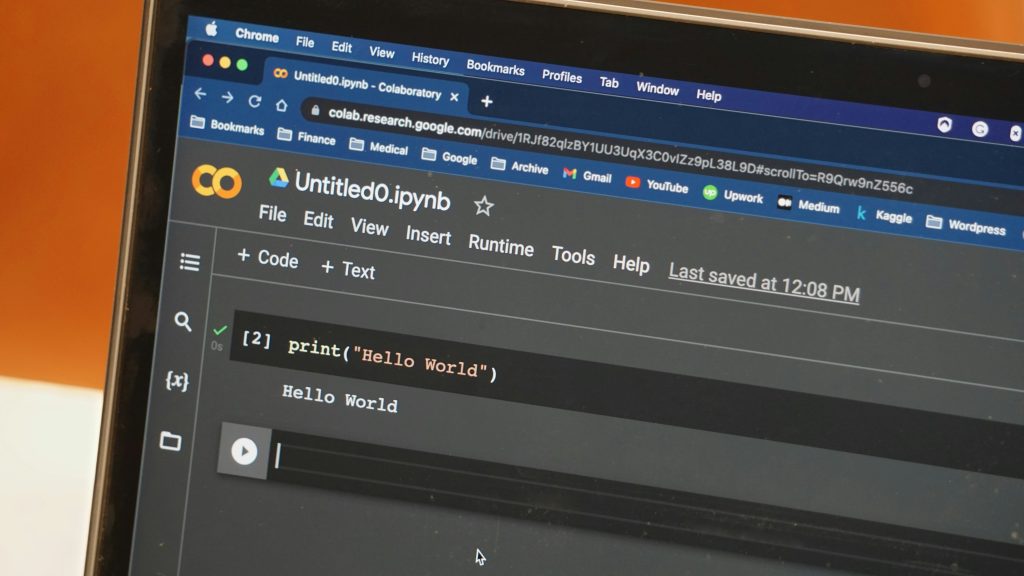
To reach a traditional programming milestone, let’s write the iconic “Hello, World!” program. Open your code editor and create a new file named hello.py. Type the following code:
print(“Hello, World!”)
Run the file via the terminal or command prompt using python hello.py, and you’ll see the message printed out. Congratulations, you’ve just run your first Python program!
Fundamental Concepts in Python
Variables and Data Types
Variables in Python are used to store data that can be referenced later. Python is dynamically typed, meaning you don’t need to declare the data type explicitly. You can create variables like this:
name = “Alice” age = 30
Common data types include:
- Strings: Text data, enclosed in quotes.
- Integers: Whole numbers.
- Floats: Decimal numbers.
- Booleans: True or False values.
Basic Operators
Python supports various operators, including:
- Arithmetic Operators:
+,-,*,/,//(floor division), and%(modulus). - Comparison Operators:
==,!=,>,<< />ode>,>=, and<=< />ode>. - Logical Operators:
and,or, andnot.
Control Flow Statements
Control flow statements allow your program to make decisions. The most common statements are:
- If Statements: Used to execute code when a condition is true.
if age >= 18: print(“You’re an adult.”)
- For Loops: Iterating over a sequence or range.
for i in range(5): print(i)
- While Loops: Continue executing while a condition remains true.
while age